Certificate Assistant - New Certificate Location
Where is the location of newly generated certificate on Mac computer? I can not find the self-signed certificate generated by Certificate Assistant.
✍: FYIcenter.com
 If you created a self-signed root certificate Certificate Assistant
on your Mac computer, it will be stored inside "login" keychain.
If you created a self-signed root certificate Certificate Assistant
on your Mac computer, it will be stored inside "login" keychain.
Here are the steps to find your newly generated certificate.
1. Open "Launchpad > Other". You see "Keychain Access" app icon.
2. Click "Keychain Access" icon to launch it. You see "Keychain Access" window.
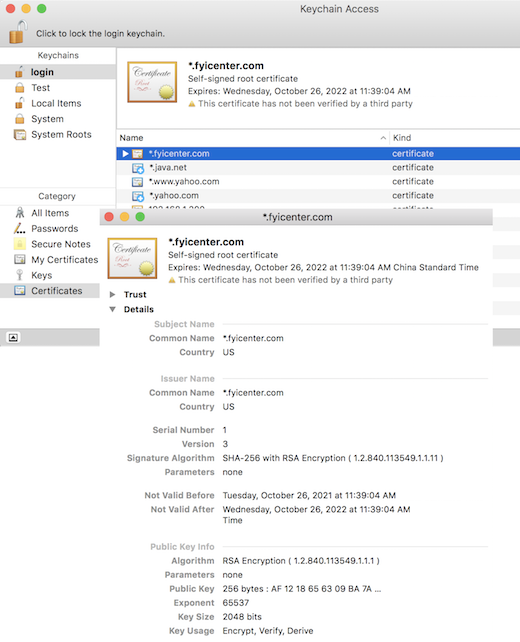
3. Click "login" in the "Keychains" list on left. And select "Certificates" in the "Category" list. You see a list of certificates.
4. Scroll the list, you will find newly generated certificate, *.fyicenter.com.
5. Double-click on the name to open it. You see certificate details:
Subject Name:
  Common Name: *.fyicenter.com
  Country: US

Issuer Name:
  Common Name: *.fyicenter.com
  Country: US

Signature Algorithm: SHA-256 with RSA Encryption

Public Key Info
  Algorithm: RSA Encryption
  Public Key: 256 bits: ...
⇒ Certificate Assistant - Private Key of Self-Signed Certificate
⇐ Certificate Assistant - Create Self-Signed Certificate
2022-04-21, ∼2112🔥, 0💬
Related Topics:

