View Website Certificate in Safari
Q
How to view the certificate of a Website in Apple Safari?
✍: FYIcenter.com
A
 If a Website has a valid certificate,
you can follow this tutorial to view the certificate
in Apple Safari.
If a Website has a valid certificate,
you can follow this tutorial to view the certificate
in Apple Safari.
1. Run Apple Safari and go to https://www.apple.com.
2. Click the lock icon next to the Web address field. You see the Website security dialog box displaying the following messages:
Safari is using an encrypted connection to www.apple.com.

Encryption with a digital certificate keeps information private
as it's sent to or from the https website www.apple.com.

...

[Show Certificate]
3. Click "Show Certificate". You see the Website certificate summary.
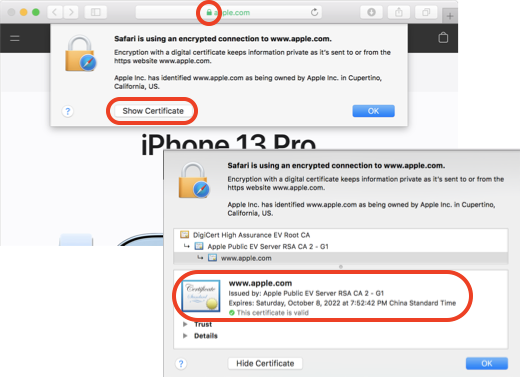
⇒ Detailed Information of Website Certificate in Safari
⇐ Website Certificate Status in Safari
2022-07-01, ∼3277🔥, 0💬
Related Topics:


