What Is Certificate Assistant on Mac
What is Certificate Assistant on Mac computer? Can I use it to generate a certificates?
✍: FYIcenter.com
 Certificate Assistant is built-in tool in Keychain Access on Mac computers
provides an easy way to create and manage certificates.
Certificate Assistant is built-in tool in Keychain Access on Mac computers
provides an easy way to create and manage certificates.
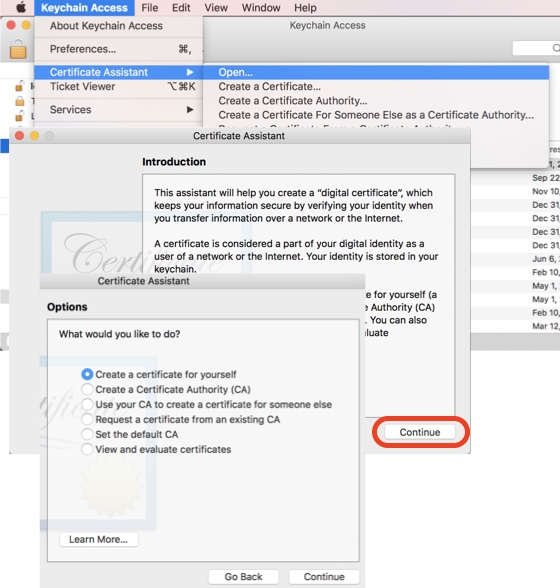
Main functionalities of Certificate Assistant include:
- Create a certificate - Generating a self-signed certificate for yourself.
- Create a certificate authority - Generating root CA certificate that enables you to issue certificates to others.
- Create a certificate for someone else as a certificate authority
- Request a certificate from a certificate authority
- Set the default certificate authority
- Evaluate a certificate
Here is how to use Certificate Assistant on your Mac computer.
1. Open "Launchpad > Other". You see "Keychain Access" app icon.
2. Click "Keychain Access" icon to launch it. You see "Keychain Access" window.
3. Click "Keychain Access > Certificate Assistant > Open" in the menu. You see "Certificate Assistant" instruction window.
4. Click "Continue" on instruction window. You see the "Options" window.
⇒ Certificate Assistant - Create Self-Signed Certificate
⇐ Using Certificate Assistant on Mac
2022-02-19, ∼5173🔥, 0💬
Related Topics:

