Certificate Assistant - Create ECC Certificate
How to create a certificate with ECC algorithm using Certificate Assistant on Mac computer? I heard that ECC algorithm is better than RSA.
✍: FYIcenter.com
 If you want to select ECC algorithm or other options
when creating a self-signed root certificate on your Mac computer,
you need override Certificate Assistant defaults
as shown in this tutorial.
If you want to select ECC algorithm or other options
when creating a self-signed root certificate on your Mac computer,
you need override Certificate Assistant defaults
as shown in this tutorial.
1. Start Certificate Assistant inside Keychain Access as shown in the previous tutorial.
2. Select "Create a Certificate for yourself" option and click "Continue". You see the "Create Your Certificate" window.
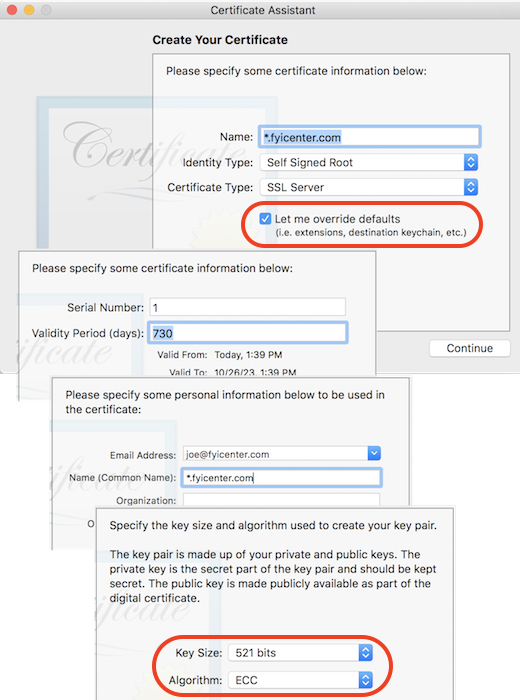
3. Enter required info and check "Let me override defaults" option. This allows you to review and change every parameters during the certificate generation process.
Name: *.fyicenter.com
Identity Type: Self Signed Root
Certificate Type: SSL Server

[x] Let me override defaults
4. Click "Create". You see serial number and validity period options.
5. Click "Continue". You see email and common name options.
6. Click "Continue". You see algorithm and key size options. Change them to "ECC" and "521 bits".
7. Click "Continue". You see "Key Usage Extension" options.
8. Click "Continue". You see "Extended Key Usage Extension" options.
9. Click "Continue". You see "Basic Constraints Extension" options.
10. Click "Continue". You see "Subject Alternative Name Extension" options.
11. Click "Continue". You see Keychain location option.
12. Click "Create" on the message box. You see the "Conclusion" window with a summary of the newly generated certificate.
⇒ Certificate Assistant - CSR (Certificate Signing Request)
⇐ Certificate Assistant - Private Key of Self-Signed Certificate
2022-04-13, ∼1904🔥, 0💬
Related Topics:

