Certificate Assistant - CSR (Certificate Signing Request)
How to create a CSR (Certificate Signing Request) using Certificate Assistant on Mac computer? I have a self-signed certificate.
✍: FYIcenter.com
 If you have a private key stored in Keychain Access on your Mac computer,
you can generate a CSR (Certificate Signing Request) for a root CA to sign it
as shown in this tutorial.
If you have a private key stored in Keychain Access on your Mac computer,
you can generate a CSR (Certificate Signing Request) for a root CA to sign it
as shown in this tutorial.
1. Start Certificate Assistant inside Keychain Access as shown in the previous tutorial.
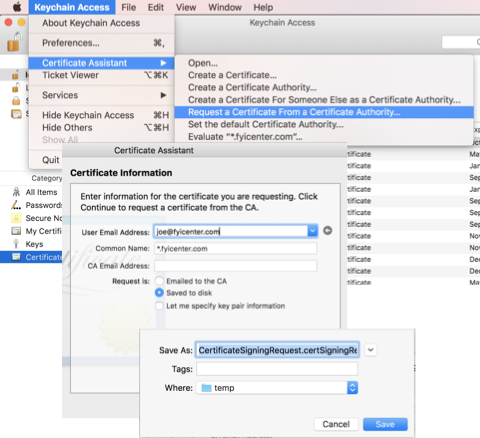
2. Click "Keychain Access > Certificate Assistant > Request a Certificate From a Certificate Authority" from the menu. You see the request window.
3. Enter the following information:
User Email Address: joe@fyicenter.com
Common Name: *.fyicenter.com
Request is: [x] Save to disk
4. Click "Continue". Certificate Assistant will search the self-signed certificate of the given Common Name.
5. If a match is found, you see the CSR file save window. If no match is found, you see an error window.
6. Click "Save". A CSR file is generated.
-----BEGIN CERTIFICATE REQUEST-----
MIICfzCCAWcCAQAwOjEcMBoGCSqGSIb3DQEJARYNanVua0BqdW5rLmNvbTENMAsG
A1UEAwwESnVuazELMAkGA1UEBhMCVVMwggEiMA0GCSqGSIb3DQEBAQUAA4IBDwAw
ggEKAoIBAQDCvbpwG/ffixnwCFGEoILD7HcNCIFW4CoDKA2+B43u7FTLK4Zxc4zr
...
PkJqHjCrzyjL89+DUqIz+l7WZw==
-----END CERTIFICATE REQUEST-----
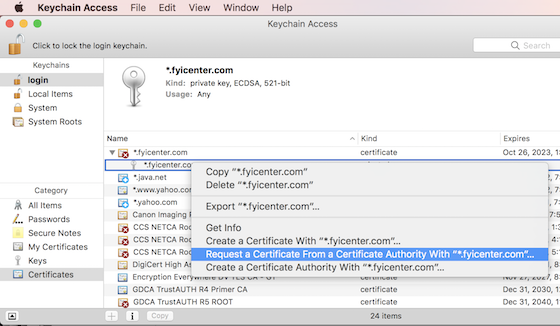
You can also right-click on the private key name, and select "Request a Certificate From a Certificate Authority with ..." to start the CSR generation process. But you still have to enter the correct Common Name that matches the self-sign certificate on the CSR request window.
Certificate Assistant seems to have code bug that preventing it to auto-fill the Common Name from the selected certificate.
⇒ Certificate Assistant - Create Root CA
⇐ Certificate Assistant - Create ECC Certificate
2022-04-13, ∼1791🔥, 0💬
Related Topics:

