certmgr.msc - Delete Certificate from Certificate Store
How to delete a certificate from a certificate store using "certmgr.msc"? The certificate has been expired long time ago and I don't want it any more
✍: FYIcenter.com
 You can delete a certificate from a certificate store
using the "certmgr.msc" tool as shown in this tutorial.
You can delete a certificate from a certificate store
using the "certmgr.msc" tool as shown in this tutorial.
1. Start "certmgr.msc" Management Console on your Windows system. You see list of certificate stores showing up.
2. Click to open "Trusted Root Certificate Authorities" and click on "Certificates".
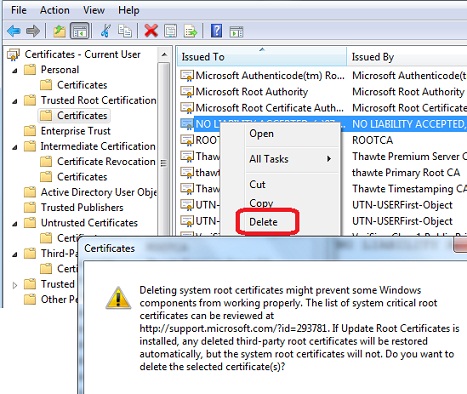
3. Locate and right-mouse click on "NO LIABILITY ACCEPTED, (c)97 VeriSign, Inc.". You see context menu showing up.
4. Click "Delete" command in the menu. You see a warning message showing up.
Deleting system root certificate might prevent some Windows components from
working properly. The list of system critical root certificates can be
reviewed at http://support.microsoft.com/?id=293781. If Update Root
Certificate is installed, any deleted third-party root certificates will be
restored automatically, but the system root certificate will not. Do you
want to delete the selected certificate(s)?
5. Click "Yes" button to finish deleting the certificate.
⇒ certmgr.msc - Search Certificate in Certificate Stores
⇐ certmgr.msc - Export Certificate from Certificate Store
2012-08-03, ≈26🔥, 0💬
Related Topics:
