View Page Security Detail Info in Google Chrome 51
How to see more security related information on a Web page in Google Chrome 51?
✍: FYIcenter.com
 To see more security related information on a Web page in Google Chrome 51,
you can follow this tutorial:
To see more security related information on a Web page in Google Chrome 51,
you can follow this tutorial:
1. Run Google Chrome 51 and visit www.paypal.com Web site. You see PayPal home page showing up.
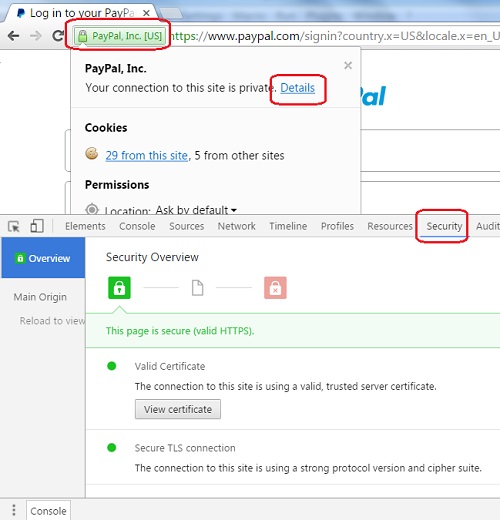
2. Click on the lock icon next to the Website address box You see web page information displayed.
3. Click "Details" at the end of the connection information line. You see a page inspection section showing up in the second half of the window with the "Security" tab open.
4. Review the security detail information:
This page is secure (Valid HTTPS)

Valid Certificate
   The connection to the site is using a valid trusted server
   certificate.

Secure TLS Connection
   The connection to the site is using a strong protocol version
   and cipher suite.

Secure Resources
   All resources on this page are served securely.
This confirms that PayPal login page is fully secure.
The picture below shows you the Security tab of the Web page inspection section on Google Chrome 51:
⇒ View Website Server Certificate in Google Chrome 51
⇐ View Page Info in Google Chrome 51
2013-11-25, ∼8893🔥, 0💬
Related Topics:
