View Website Server Certificate in Google Chrome 51
How to view the server certificate of the Website in Google Chrome 51? I know the Web site uses a "https" address.
✍: FYIcenter.com
 If you are visiting a Web site that uses a "https" address with Google Chrome 51,
you can view the server certificate of the site
as shown in this tutorial:
If you are visiting a Web site that uses a "https" address with Google Chrome 51,
you can view the server certificate of the site
as shown in this tutorial:
1. Run Google Chrome 51 and visit https://www.paypal.com Web site.
2. Press "F12" key, press "Ctrl + Shift + i" keys, or click "Menu > More tools > Developer tools". You see developer panel showing up.
3. Click "Security" tab in the Developer panel. You see "Security Overview" information showing up.
4. Click "View Certificate" button. You see general information of PayPal server certificate showing up.
The picture below shows you how to view server certificate on Google Chrome 51:
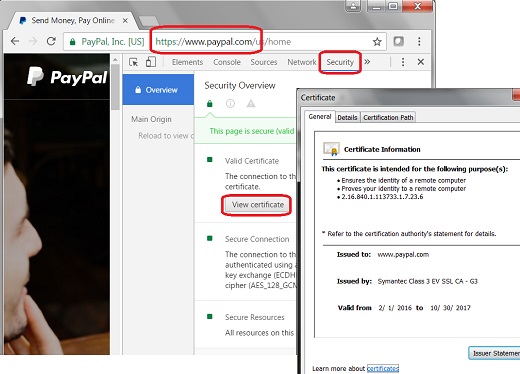
Note that before Chrome 56, you can click on the lock icon next to the Website address box to access the "Security" tab of the Developer panel directly. Starting from Chrome 56, the lock icon only displays a summary of security related settings.
⇒ General Info of Server Certificate in Google Chrome 51
⇐ View Page Security Detail Info in Google Chrome 51
2024-02-24, ≈15🔥, 15💬
Related Topics:
