Start "Certificate Manager" in Mozilla Firefox 125
How to start the "Certificate Manager" in Mozilla Firefox 125? I heard that it can be used to manage root CA certificates and personal certificates for Mozilla Firefox 125.
✍: FYIcenter.com
 To start "Certificate Manager" in Mozilla Firefox 125,
you need to use the "Settings > Privacy & Security" menu
as shown below:
To start "Certificate Manager" in Mozilla Firefox 125,
you need to use the "Settings > Privacy & Security" menu
as shown below:
1. Run Mozilla Firefox 125.
2. Click the menu icon. You see a pop up menu.
3. Click the "Settings" entry in the pop up menu. You see a Settings page displayed.
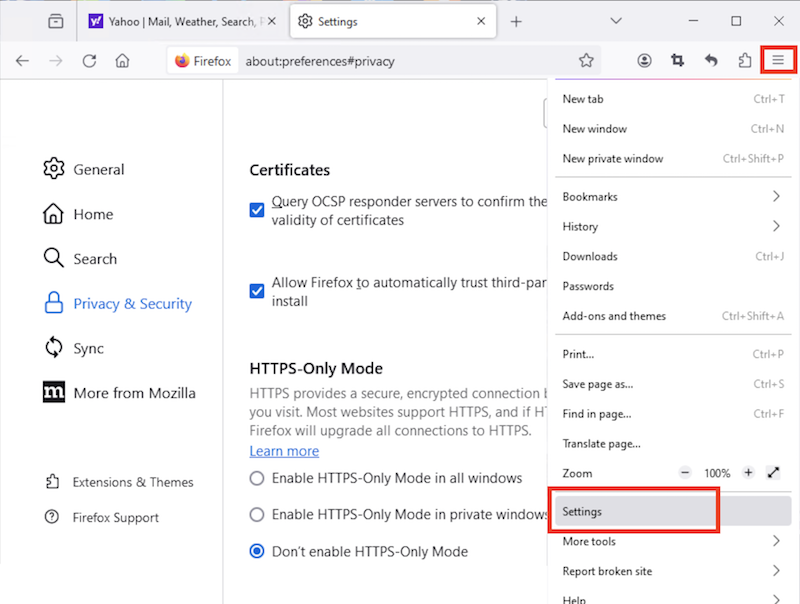
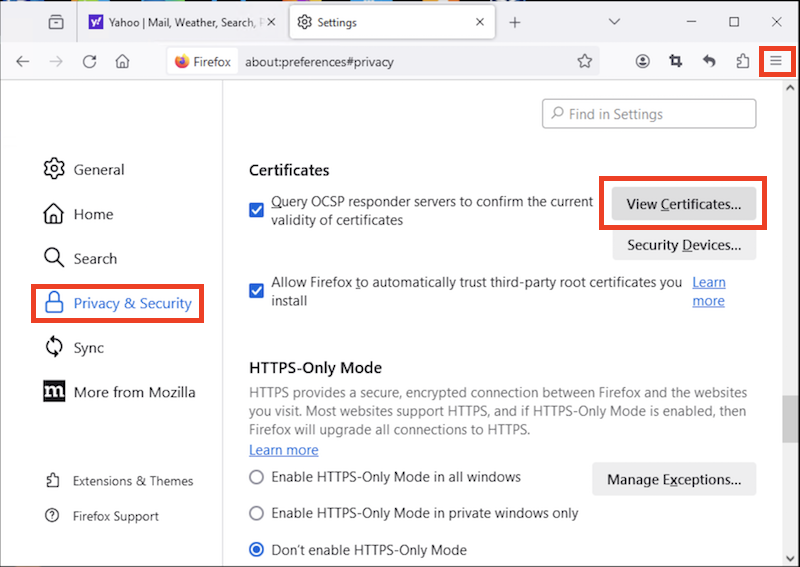
4. Click the "Privacy & Security" link in the left menu. You see privacy and security settings displayed.
5. Scroll down and click "View Certificates" button in the Certificates section. You see the Certificate Manager displayed.
See next tutorials on how to use Certificate Manager.
⇒ Certificate Stores in Mozilla Firefox 125
⇐ Export Website Certificate from Mozilla Firefox 125
2026-01-24, ≈10🔥, 0💬
Related Topics:
