Export Website Certificate from Mozilla Firefox 125
How to Export Website Certificate from Mozilla Firefox 125? I want to save the Website certificate as a file.
✍: FYIcenter.com
 Unfortunately, Mozilla Firefox 125 does not offer any ways
to export the Website certificate into a file on the
Certificate Viewer.
Unfortunately, Mozilla Firefox 125 does not offer any ways
to export the Website certificate into a file on the
Certificate Viewer.
1. Run Mozilla Firefox 125 and visit https://www.yahoo.com/. You see Yahoo Website displayed with a lock icon displayed next to the Website address.
2. Click the lock icon on the left of the Website address. You see the site information dialog box displayed:
3. Click the "Connection secure" link. You see security properties displayed:
4. Click the "More information" link. You see the Page Info window displayed with the "Security" tab opened.
5. Click the "View Certificate" button. You see the Website certificate displayed in the Certificate Viewer.
6. Scroll down to the Miscellaneous section. You will 2 download options: "PEM (cert)" and "PEM (chain)".

7. Click the "PEM (cert)" option. You will see the Website certificate exported to a file called "fantasysports-yahoo-com.pem" on your local computer.
8. Click the "PEM (chain)" option, if you want to export all certificates in the certificate chain including the root CA certificate.
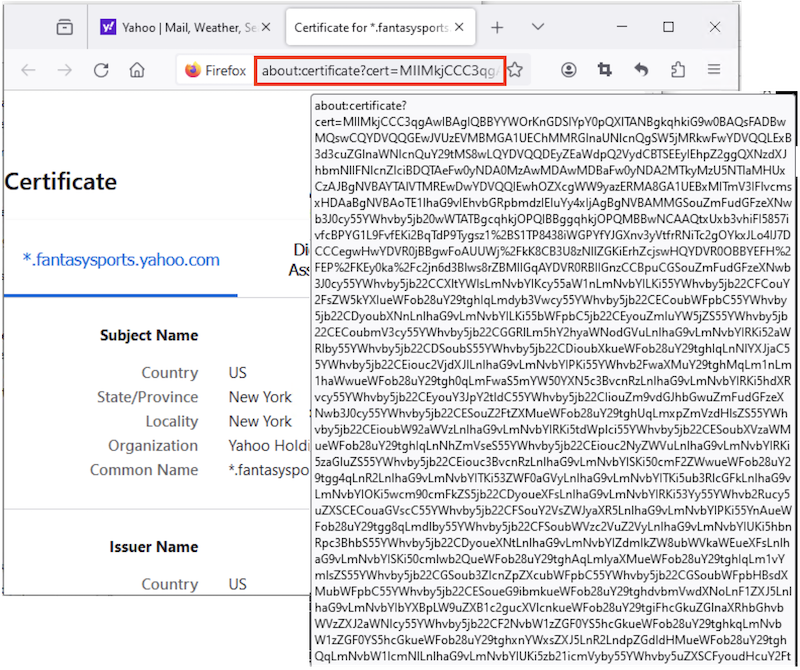
9. You can also move the mouse over the page address field to see the Website certificate displayed encoded in Base64 format.
⇒ Start "Certificate Manager" in Mozilla Firefox 125
⇐ View Certificate Chain with Mozilla Firefox 125
2026-01-03, ≈10🔥, 0💬
Related Topics:
