List of Root CA Certificates in Mozilla Firefox 125
How to see the list of root CA certificates used by Mozilla Firefox 125?
✍: FYIcenter.com
 To see the list of root CA (Certificate Authorities) certificates used by Mozilla Firefox 125,
you need to use the Certificate Manager in Mozilla Firefox 125
as shown below:
To see the list of root CA (Certificate Authorities) certificates used by Mozilla Firefox 125,
you need to use the Certificate Manager in Mozilla Firefox 125
as shown below:
1. Open the Certificate Manager as shown in the last tutorial.
2. Click the "Authorities" tab. You see the list of root CA certificates showing up.
ACCVRAIZ1 - ACCV
Actalis Authentication Root CA - Actalis S.p.A.
AffirmTrust Premium ECC - AffirmTrust
...
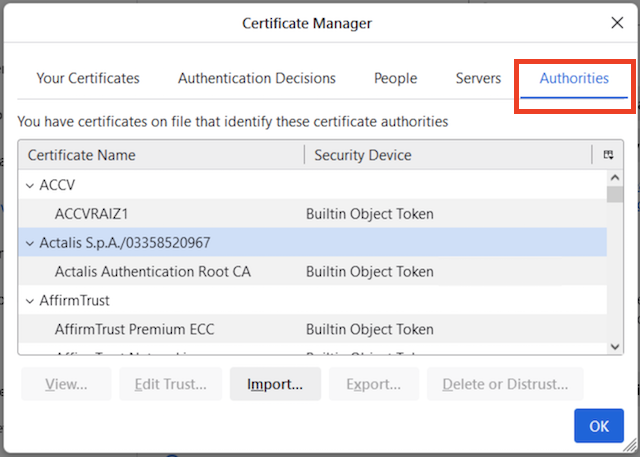
Most of the root CA certificates are provided by the Mozilla Firefox installation process. Some are provided by the operating system, if you have the "security.enterprise_roots.enabled" turned on, see the related tutorial.
⇒ Manage Root CA Certificates in Mozilla Firefox 125
⇐ Certificate Stores in Mozilla Firefox 125
2025-03-12, ≈10🔥, 0💬
Related Topics:
