Connection Info on Page Properties in IE
How to read the connection information on the page properties screen in IE? What is the meaning of "TLS 1.2."?
✍: FYIcenter.com
 This tutorial may help you understand the connection information
provided on the page properties screen in IE.
This tutorial may help you understand the connection information
provided on the page properties screen in IE.
1. Run IE and visit www.bestbuy.com Web site.
2. Click "Sign in" on top of the page. You see the "Sign In" page showing up with "https" as part of the page address.
3. Right-mouse click anywhere on the page. You see IE context menu showing up.
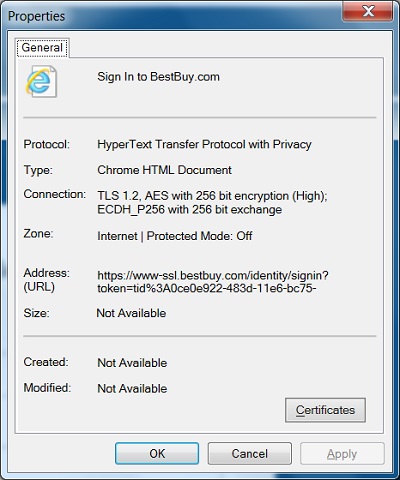
4. Click "Properties" menu item. You see "Properties" screen showing up with these fields:
- "Protocol: HyperText Transfer Protocol with Privacy" - This tells you that this site is using the HTTPS (Hypertext Transfer Protocol Secure) protocol to communicate with your computer.
- "Address (URL): https://www-ssl.bestbuy.com/..." - The "https" part of the address confirms that HTTPS protocol is used.
- "Connection: TLS 1.2 AES with 256 bit encryption (High); ECDH_P256 with 256 bit exchange." - This tells you that this site is using TLS (Transport Layer Security) Version 1.2 to encrypt all data exchanged between your computer and the site.
See the picture below:
⇒ View Web Site Server Certificate in IE
⇐ Context Menu for Page Properties in IE
2012-07-30, ≈12🔥, 0💬
Related Topics:
