Context Menu for Page Properties in IE
Where to click to get more Web site information in IE? I want to know if the page I am reading is secure or not.
✍: FYIcenter.com
 If a Web page is having "https" as part of the page address,
it is a secured page. But if you want to know more information
about this page, you need to use context menu in IE
as shown in this tutorial.
If a Web page is having "https" as part of the page address,
it is a secured page. But if you want to know more information
about this page, you need to use context menu in IE
as shown in this tutorial.
1. Run IE and visit www.bestbuy.com Web site. You see Best Buy home page showing up.
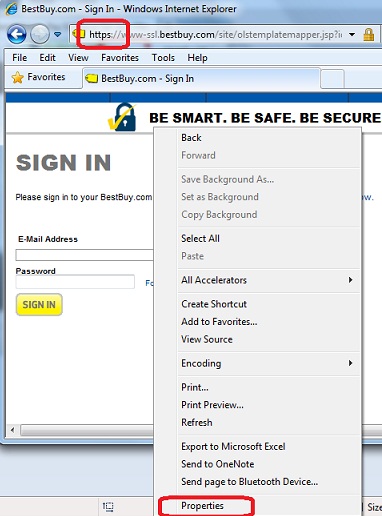
2. Click "Sign in" on top of the page. You see the "Sign In" page showing up with "https" as part of the page address.
3. Right-mouse click anywhere on the page.
You see IE context menu showing up.
"Properties" is listed as a command for you
to see more information about this page.
⇒ Connection Info on Page Properties in IE
⇐ Import Root CA Certificate into IE
2012-07-30, ∼7756🔥, 0💬
Related Topics:
