"This Connection is Untrusted" Error in Mozilla Firefox 9
Why I am getting the "This Connection is Untrusted" error screen in Mozilla Firefox 9?
✍: FYIcenter.com
 You will see the "This Connection is Untrusted" error screen in Mozilla Firefox 9,
if Mozilla Firefox failed to validate the server certificate provided by the Web site you are visiting.
One of the reason for the validation failure is missing the root CA certificate in Mozilla Firefox
as shown in this tutorial:
You will see the "This Connection is Untrusted" error screen in Mozilla Firefox 9,
if Mozilla Firefox failed to validate the server certificate provided by the Web site you are visiting.
One of the reason for the validation failure is missing the root CA certificate in Mozilla Firefox
as shown in this tutorial:
1. Run Mozilla Firefox 9 and go to "Tools > Options" menu.
2. Click "Advanced > Encryption" tab and "View Certificates" button.
3. Click "Authorities" tab and select "VeriSign Class 3 Public Primary Certification Authority - G5".
4. Click "Export..." button to save a copy of this CA certificate to a file called "VeriSignCA.crt".
5. Click "Delete or Distrust..." button to delete it from Mozilla Firefox.
6. Visit Web site "https://www.paypal.com". You see the "This Connection is Untrusted" error screen showing up.
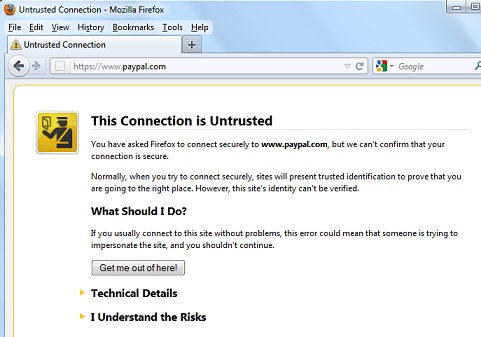
We know why. We deleted the root CA certificate from Mozilla Firefox.
⇒ Add Certificate Validation Exception in Mozilla Firefox 9
⇐ List of Root CA Certificates Used by Mozilla Firefox 9
2016-08-30, ∼3907🔥, 0💬
Related Topics:

💬 2020-05-27 John Bidden: That is goooooooood
💬 2020-05-27 Huhu Joson: I think it is a wonderful website...

