Export Web Site Server Certificate in Safari 5
How to export the server certificate to a file from Safari 5? I know how to view the server certificate used by the Web site, but I want to save it to a file.
✍: FYIcenter.com
If you are visiting a Web site that uses a "https" address with Safari 5, you can save the server certificate of the site to a file as shown in this tutorial:
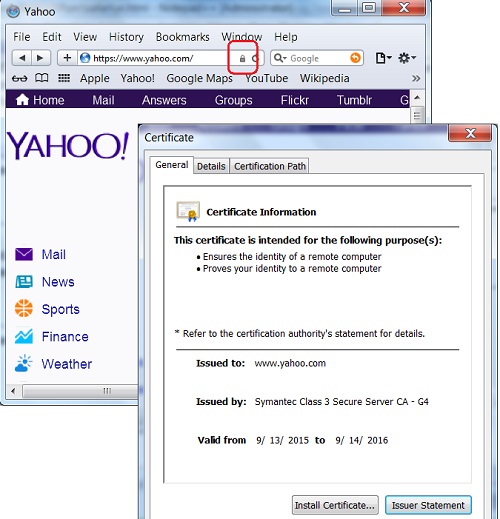
1. Run Safari 5 and visit https://www.yahoo.com Web site.
2. Open the server certificate by clicking the "Lock" icon at the end of the Web site address input box. You see the certificate screen showing up.
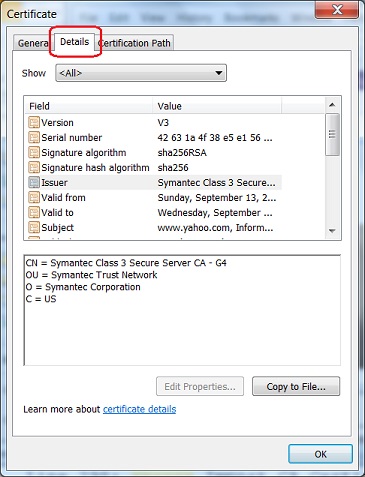
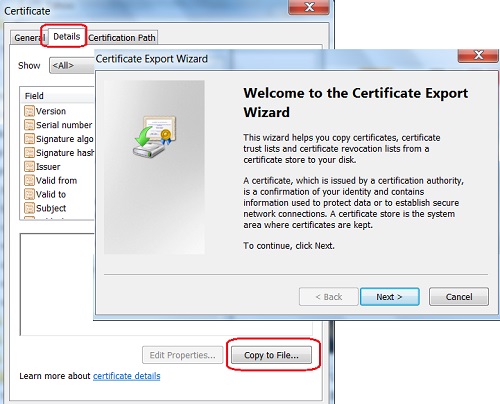
3. Click on the "Details" tab. List of detail fields showing up.
4. Click on the "Copy to File..." button. You see the Certificate Export Wizard showing up.
5. Follow the instruction to finish exporting
the certificate.
2015-10-12, ∼3253🔥, 0💬
Related Topics: