Install OpenSSL 0.9.8h on Windows
How to install OpenSSL on Windows? I have downloaded the "openssl-0.9.8h-1-setup.exe" on the desktop.
✍: FYIcenter.com
 If you have "openssl-0.9.8h-1-setup.exe" available,
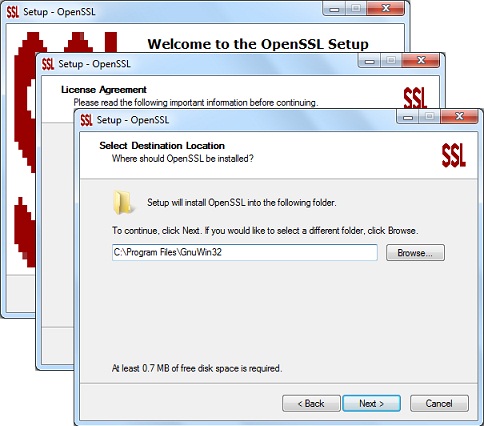
you can install OpenSSL 0.9.8h on Windows using these steps:
If you have "openssl-0.9.8h-1-setup.exe" available,
you can install OpenSSL 0.9.8h on Windows using these steps:
1. Double-click on "openssl-0.9.8h-1-setup.exe" to start the installation wizard.
2. Click "Next" button on the first screen.
3. Check "I accept the agreement" and click "Next" button on the license agreement screen.
4. Keep the default installation location: "C:\Program Files\GnuWin32" and click "Next" button on the destination location screen.
5. Keep all 3 components: Binaries, Documentation, Developer files, and click "Next" button on the component screen.
6. Keep the default menu name: "GnuWin32\OpenSSL" and click "Next" button on the menu folder screen.
7. Keep the "Create document shortcuts in Start Menu folder" selection and click "Next" button on the additional tasks screen.
7. Click "Next" button on the confirmation screen.
8. Wait for the installation to finish and click "Finish" button
on the last screen.
⇒ Start OpenSSL on Windows Systems
⇐ Download OpenSSL 0.9.8h for Windows
2012-07-23, ≈18🔥, 0💬
Related Topics:


💬 2023-10-12 Gulam: openssl rand -base64 32
💬 2021-08-06 a: openssl req -new x509 -nodes -out server.crt -keyout server.key
