Summary View of Root CA Certificate on Mac
How to view summary information of a root CA certificate on Mac computer? I want to know when is the expiration of the certificate.
✍: FYIcenter.com
 To view summary information of a root CA certificate on your Mac computer,
you can follow this tutorial.
To view summary information of a root CA certificate on your Mac computer,
you can follow this tutorial.
1. Open "Launchpad > Other > Keychain Access" on your Mac computer. You see "Keychain Access" window.
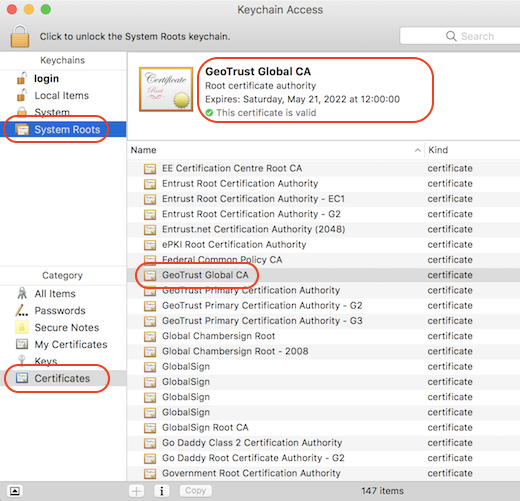
2. Click "System Roots" in the "Keychains" list on left. And select "Certificates" in the "Category" list. You see a list of trusted root CA certificates.
3. Scroll down in the list and click on "GeoTrust Global CA". You see the Certificate summary showing up above the list.
The expiration date for this CA certificate is 5/21/2022.
⇒ Details View of Root CA Certificate on Mac
⇐ What Is Keychain Access on Mac
2021-11-30, ∼1547🔥, 0💬
Related Topics:


