Delete Root CA Certificate from Mac
How to delete a root CA (Certificate Authority) certificate from Mac computer? I don't know this root CA and don't want to trust any Websites that uses certificates signed by this root CA.
✍: FYIcenter.com
 On Mac computers, you can not delete a root CA certificate using
Keychain Access as the certificate manager.
On Mac computers, you can not delete a root CA certificate using
Keychain Access as the certificate manager.
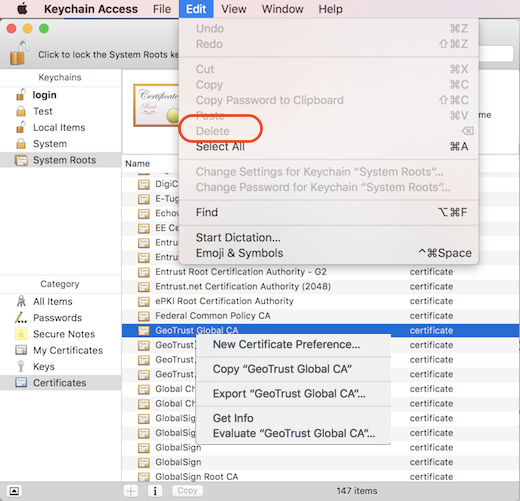
"delete" functions are all disabled for root CA certificates in Keychain Access as shown in this tutorial.
1. Open "Launchpad > Other > Keychain Access" on your Mac computer. You see "Keychain Access" window.
2. Click "System Roots" in the "Keychains" list on left. And select "Certificates" in the "Category" list. You see a list of trusted root CA certificates.
3. Scroll down in the list and click on "GeoTrust Global CA". You see the Certificate summary showing up above the list.
4. Click "Edit" menu. You see the "Delete" command is disabled.
5. Right-click on the "GeoTrust Global CA" name. You see no "Delete" command in the context menu.
So you can not delete a root CA certificate on Mac computer with "Keychain Access".
Also note that:
- You can delete non-root certificates stored in other keychains.
- You can flag root certificates as "Never Trust" to disable it as shown in the next tutorial.
⇒ "Never Trust" Root CA Certificate on Mac
⇐ Certificate File Format Supported on Mac
2021-11-30, ∼2253🔥, 0💬
Related Topics:
