General View of Root CA Certificate in Google Chrome 51
How to view general information of a root CA certificate in Google Chrome 51? I want to know when is the expiration on the certificate.
✍: FYIcenter.com
 To view general information of a root CA certificate in Google Chrome 51,
you can double-click on the Certificate name in the CA certificate list
as shown below:
To view general information of a root CA certificate in Google Chrome 51,
you can double-click on the Certificate name in the CA certificate list
as shown below:
1. Start "Certificate Manager" in Google Chrome 51.
2. Click "Trusted Root Certification Authorities" tab. You see the list of trusted CA certificates showing up.
3. Scroll down in the list and double-click on "DigiCert Global Root CA" under "DigiCert Inc". You see the Certificate Viewer showing up.
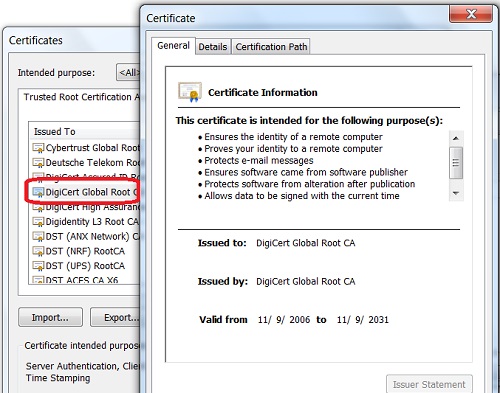
The expiration date for this root CA certificate is 11/9/2031.
⇒ Details View of Root CA Certificate in Google Chrome 51
⇐ Trusted Root Certification Authorities in Google Chrome 51
2013-11-20, ∼8004🔥, 0💬

