Connection Tab of Viewing Page Info in Google Chrome 29
How to see more security related information on View Page Info in Google Chrome 29?
✍: FYIcenter.com
 To see more security related information on View Page Info in Google Chrome 29,
you can follow this tutorial:
To see more security related information on View Page Info in Google Chrome 29,
you can follow this tutorial:
1. Run Google Chrome 29 and visit www.paypal.com Web site. You see PayPal home page showing up.
2. Right-mouse click anywhere on the page.
3. Click "View Page Info" menu item. You see the information on cookies and permissions displayed.
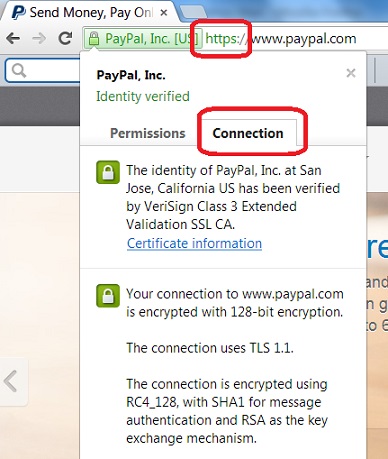
4. Click "Connection" tab. You see more information on how your browser is connected to PayPal web site.
The identity of PayPal, Inc. at San Jose, Califonia US has been verified
by VeriSign Class Extended Validation SSL CA.

Your connection to www.paypal.com is encrypted with 128-bit encryption.

The connection uses TLS 1.1.

The connection is encrypted using RC4_128, with SHA1 for message
authentication and RSA as the key exchange mechanism.
See the picture below:
⇒ View Website Server Certificate in Google Chrome 29
⇐ Context Menu for Viewing Page Info in Google Chrome 29
2016-07-15, ∼6399🔥, 0💬


