Security Tab of Viewing Page Info in Mozilla Firefox 47
Q
How to see more security related information on View Page Info in Mozilla Firefox 47?
✍: FYIcenter.com
A
 To see more security related information on View Page Info in Mozilla Firefox 47,
you can follow this tutorial:
To see more security related information on View Page Info in Mozilla Firefox 47,
you can follow this tutorial:
1. Run Mozilla Firefox 47 and visit www.paypal.com Web site. You see PayPal home page showing up.
2. Right-mouse click anywhere on the page.
3. Click "View Page Info" menu item. You see "Page Info" screen showing up.
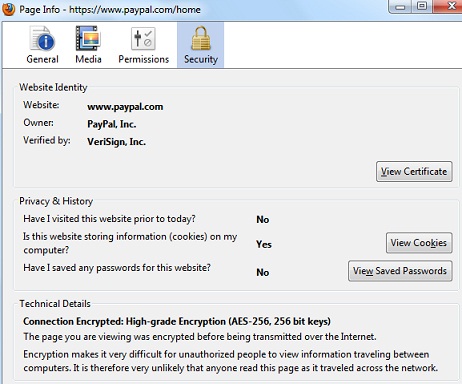
4. Click "Security" tab. You see security information displayed for this PayPal page:
Technical Details
"Connection Encryption: High-grade Encryption (AES-256, 256 bit keys)"
This page you are viewing was encrypted before being transmitted over the
the Internet. Encryption makes it very difficult for unauthorized people to
view information traveling between computers. It is therefor very unlikely
that anyone read this page as it travels across the networks.
See the picture below:
⇒ View Website Server Certificate in Mozilla Firefox 47
⇐ General Tab of Viewing Page Info in Mozilla Firefox 47
2012-07-25, ∼9048🔥, 0💬
Related Topics:
