View/Remove Certificate Exceptions in Mozilla Firefox 47
How to view certificate exceptions that I have added in the past in Mozilla Firefox 47? I want to remove some of them.
✍: FYIcenter.com
 Each time you add a certificate exception for a website in Mozilla Firefox 47,
the invalid certificate of the website is added to Mozilla Firefox 47 under
the "Servers" certificate category.
Each time you add a certificate exception for a website in Mozilla Firefox 47,
the invalid certificate of the website is added to Mozilla Firefox 47 under
the "Servers" certificate category.
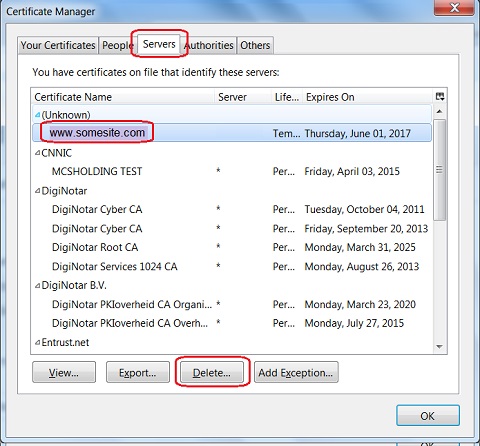
You follow these steps to view and delete certificate in the "Server" category to remove certificate exceptions.
1. Run Mozilla Firefox 47 and go to "Tools > Options" menu.
2. Click "Advanced > Certificates" tab and "View Certificates" button.
3. Click "Servers" tab and select "somesite.com" certificate, which was added by you as a certificate exception.
4. Click "Delete..." button to remove the certificate exception
⇒ 5 Certificate Categories in Mozilla Firefox 47
⇐ Add Certificate Exception in Mozilla Firefox 47
2016-08-30, ∼4664🔥, 0💬
Related Topics:

💬 2020-05-27 John Bidden: That is goooooooood
💬 2020-05-27 Huhu Joson: I think it is a wonderful website...
💬 2016-11-06 michael: i need whatsapp but my phone it cant run internet
💬 2016-11-06 michael: my phone is giving problem of apps that are not working how to fix them
