Details View of Root CA Certificate in IE
How to view detailed information of a Root CA certificate in IE?
✍: FYIcenter.com
 To view detailed information of a CA certificate in IE,
you can double-click on the Certificate name in the CA certificate list
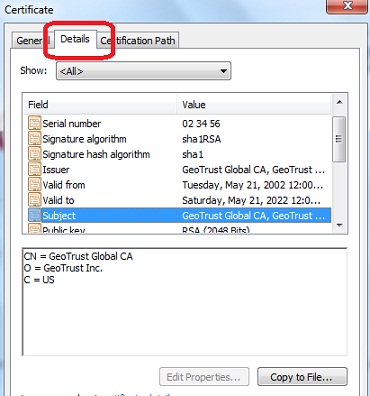
and go to the "Details" tab as shown below:
To view detailed information of a CA certificate in IE,
you can double-click on the Certificate name in the CA certificate list
and go to the "Details" tab as shown below:
1. Start "Certificate Manager" in IE.
2. Click "Trusted Root Certificate Authorities" tab. You see the list of trusted CA certificates showing up.
3. Scroll down in the list and double-click on "GeoTrust Global CA". You see the Certificate viewer showing up.
4. Click "Details" tab. You see details of the certificate showing up.
5. Click "Subject" in the Certificate Fields.
You see the value of "Subject" showing up.
⇒ Export Root CA Certificate from IE to File
⇐ General View of Root CA Certificate in IE
2012-07-30, ∼7850🔥, 0💬
Related Topics:

