List of Root CA Certificates Used by IE
Q
How to see the list of root CA certificates used by IE (Internet Explorer)?
✍: FYIcenter.com
A
 To see the list of trusted CA certificates used by IE,
you need to use the Certificate Manager inside IE
as shown below:
To see the list of trusted CA certificates used by IE,
you need to use the Certificate Manager inside IE
as shown below:
1. Click the "Tools > Internet Options" menu.
2. Click the "Content" tab.
3. Click "Certificates" button. You see the Certificate Manager showing up.
4. Click "Trusted Root Certificate Authorities" tab.
You see the list of trusted CA certificates showing up.
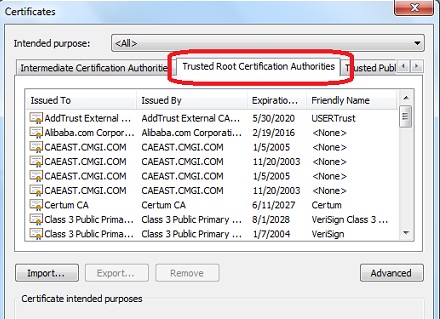
⇒ General View of Root CA Certificate in IE
⇐ Start Certificate Manager Inside IE
2012-07-30, ≈19🔥, 0💬
Related Topics:

