Java Control Panel on Mac - Certificates
Q
How to view Java VM certificates using Java Control Panel on Mac computers?
✍: .fyicenter.com
A
 To view Java VM certificates using Java Control Panel on Mac computers,
you can follow these steps:
To view Java VM certificates using Java Control Panel on Mac computers,
you can follow these steps:
1. Start "Java Control Panel" in "System Preferences".
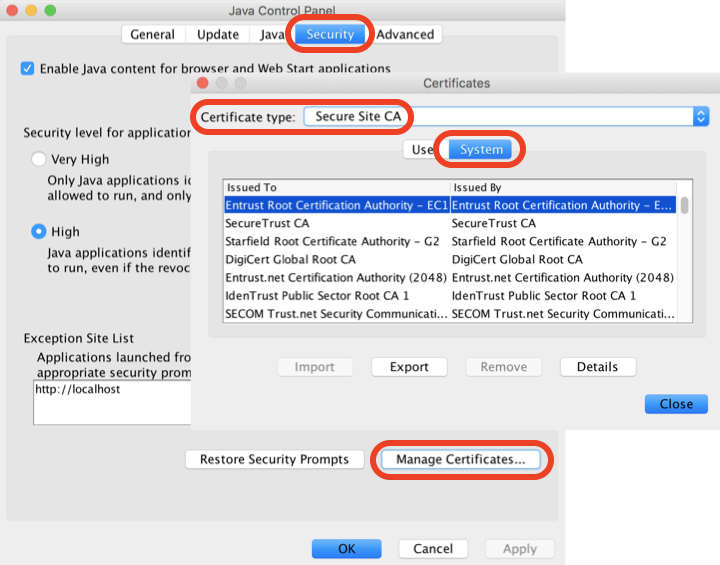
2. Click "Security" tab, then "Manage Certificates..." button. You see the certificate manager.
3. "Java Control Panel" divides certificates into 4 types:
- Trusted Certificates - These are certificates for signed applets and applications that are trusted.
- Secure site - These are certificates for secure sites.
- Signer CA - These are certificates of Certificate Authorities (CAs) for Trusted Certificates; Certificate Authorities are the ones who issue the certificates to the signers of Trusted Certificates.
- Secure site CA - These are certificates of Certificate Authorities (CAs) for secure sites; Certificate Authorities are the ones who issue the certificates for secure sites.
- Client Authentication - These are certificates for a client to authenticate itself to a server.
4. Select "Secure Site CA" as "Certificates type" and click "System". You see list of trusted CA certificates.
⇒ Java Control Panel on Mac - Certificate Details
2021-11-30, ∼7232🔥, 0💬
Related Topics:


